Showing posts with label Programming. Show all posts

Monday, July 26, 2010

Shell Script to monitor Virtual Bytes for Sawserver & NQSServer

Hi Friends,

I was troubleshooting gradual increase in physical memory consumption for Sawserver & NQSServer in our environment.

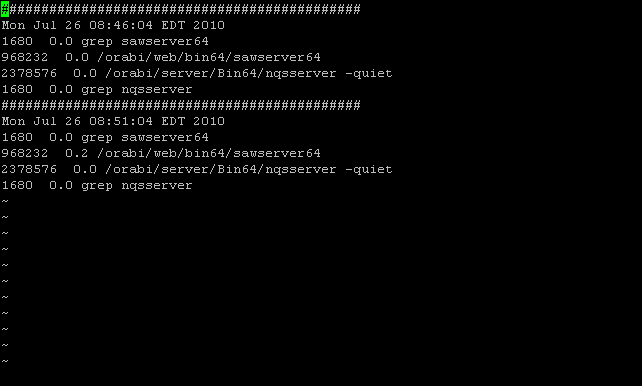
One requirement was to observe the gradual increase my logging the virtual bytes using a shell script every 5 minutes.

The command was simple: ps -ef -o vsz,pcpu,args | grep sawserver64

To automate it, i wrote a small shell script which will write the output of above command every 5minutes, until I kill the script execution:


If you go over the logic, i have wrote a never ending while loop which writes timestamp, virtual byte information for sawserver & nqsserver and included a sleep command to pause the execution for 5mins.

Customizable Sections:
1) You can add more processes to be monitored for Virtual Bytes.
2) Sleep time can be increase on decreased. It accepts input in seconds, i.e. 300=5mins

How to Invoke:
1)Make sure that the script has executable rights or do chmod 777 VirtualByteTrace.sh
2)Invoke the script in background mode: bash-$./VirtualByteTrace.sh &

Output:


Tested successfully on Sun Solaris 10 platform.
Hope this helps you for any other process as well :-)

Keywords:
OBIEE, Sawserver, Sawserver64, NQSServer, Shell Script, Unix, Solaris, OBIEE 10.1.3.4.1, etc

Friday, July 09, 2010

Spool Date & Timestamp using PL/SQL

Hi Friends,

The other day i was trying to write an automated alert script to monitor the asynchronous requests in Siebel Server or in other words trying to monitor the S_SRM_REQUEST table for any failed async requests.

Well in order to achieve the same, i create a quick PL/SQL Script which spooled the necessary information i required as no out of box solution existed from Siebel.
But wait a minute, the timestamp was not getting captured in the spooled out :-(
It was only spooling the date instead of the entire date & time!

For e.g. if run the below SQL, it will only spool the date


Output was like below :-(:
SYSDATE
---------
07-JUL-10


Quick research on Google & it pointed me that we need to alter our session to set the NLS_DATE_FORMAT before the spool will actually capture the Date & Time...
So based on this recommendation, i revised my PL/SQL Block to:


The end result is,
SYSDATE
--------------------
07-JUL-2010 08:14:19


Yipee! :-D
I posted here, as i thought its a very useful info for everyone :-)
Happy Weekend!

Keywords:
Programming, Siebel Async Request, S_SRM_REQUEST, PL/SQL, NLS_DATE_FORMAT, SPOOL, Oracle, etc.

Tuesday, June 15, 2010

Extract %time% in Batch Programming

Hi Friends,

Date & Time are two very sensitive information which we need to extract frequently which doing any batch scripting for administrative purpose.

While, i already covered a article regarding how to correctly extract %date%, lets focus on how to extract %time% ;-)

Well, for the record, %time% variable holds information uniformly across all Windows Version. Which is good as we can easily extract our information as per needs.

But wait, there is a catch! No matter what you do & instruct your regional settings to include a leading "0" (zero) before the hour, silly DOS will always fail to do so for time prior to 10:00 am!

So lets evaluate how to extract %time%:
A simple way is like below:
@set time_temp=%TIME:~0,2%%TIME:~3,2%%TIME:~6,2%
@echo %time_temp%


This will work correctly only for time after 10:00 am as before 10:00 am, the %time% variable has value somewhat as:
C:\>echo %time%
C:\>7:06:03.64


As you can see, DOS fails to append a leading zero for your hour :-(
This makes my first approach fail instantly!

So how to go around & fix this problem?


As you can see, we simply but a check that if the extracted hour information is having the leading zero available or not...
If not, we are forcing one in the variable :-)

This should resolve your %time% extracting woes in batch programming!
If you have similar issues for extracting %date%, checkout how to extract %date%!

Keywords:
how to extract %time%, extract %time%, batch file commands, batch file command, bat files, bat file, batch files, batch script, batch scripting, batch program, windows scripting, windows scripts, DOS, %time%, Leading Zero, etc

Monday, June 14, 2010

Extract %date% in Batch Programming

Hi Friends,

One very annoying problems is extracting date & time using batch programming.
The reason is simple!
Try c:\>echo %date% on Windows 2003 Server v/s Windows 2000 Server
Windows 2000 Server Output: Sun 06/13/2010
Windows 2003 Server Output: 06/13/2010

You will see that both the output are different & that is a cause of big headache. When i write any administrative scripts for taking log backups with appropriate date, it is very important for me that such platform differences should not make my batch scripts to fail on either of the platform.

Thus, this let me out find a generic solution which will always extract correct date for me no matter its Windows 2000 Server or Window 2003 Server as the underlying platform!

My earlier way to extract date was like this:
@set date_temp=%date:~4,2%%date:~7,2%%date:~10,4%
This use to give me output as

Windows 2000 Server Output: 06132010
Windows 2003 Server Output: 3/01

As you can clearly see that my approach fails on Windows 2003 Server platform. I have the option to modify & setup my date extraction as per Windows 2003 Server platform, but that would make it fail on Windows 2000 Server :-(
So how to find that all in one code?

Well, its simple! Just have a glance at the below code:


Above code will always return you the correct date regardless of the underlying platform. It works correctly because its logic is based on the delimiter "-"
I was relieved that, atleast the delimiter is common across all the Windows Versions :-)

I hope this helps you in your batch or DOS programming :-D
If you have similar issues for extracting %time%, checkout how to extract %time%!

Keywords:
how to extract %date%, extract %date%, batch script, batch scripting, batch program, windows scripting, windows scripts, DOS, Windows 2000 Server, Windows 2003 Server, %date%, echo, etc

Saturday, November 21, 2009

Batch Program to Rename file with date & counter

One of my interface development requirements specified to take backups of a file with the prevailing sysdate appended.
Hence i sat down to see how this could be achieved with Batch Programming as my environment was Windows Platform.

An initial code was adapted from MSFN Forums & it behaved very well:

@Echo off
rem Original Batch File Code Location: http://www.msfn.org/board/lofiversion/index.php/t47812.html
rem Adapted By: Shalabhsneha Katdare (SHALABHKATDARE AT GMAILDOTCOM)
rem Reading input file
If "%1" EQU "" (
 Echo You must use parameter - name of file to rename.
 Goto :EOF
    ) ELSE (
 Set strFile2Rename=%1
    )
If not exist %strFile2Rename% (
    Echo %strFile2Rename% was not found!
    Goto :EOF
    )
For /f "usebackq delims=. tokens=1,2" %%i IN (`echo %strFile2Rename%`)    Do Set strFileExtension=%%j

rem Main code
call:ConvertDate
call:RenameFile
Goto:EOF
    
:ConvertDate    
rem Reading date format, converting and saving date
for /f "skip=1 tokens=2-4 delims=(-)" %%a in ('echo.^|date') do (
 set A=%%a&set B=%%b&set C=%%c)
set t=2&if "%date%z" LSS "A" set t=1
for /f "skip=1 tokens=2-4 delims=(-)" %%a in ('echo.^|date') do (
 for /f "tokens=%t%-4 delims=.-/ " %%d in ('date/t') do (
   set dd=%%d&set mm=%%e&set yy=%%f))
Goto:EOF

:RenameFile
ren %strFile2Rename% File_%dd%-%mm%-%yy%.%strFileExtension%
Echo File %strFile2Rename% is renamed to File_%dd%-%mm%-%yy%.%strFileExtension%

Usage:
cmd:\>rename2date filename.fileext
Output:
filename_sysdate.fileext

As you could see this was the perfect thing which i wanted. But soon i faced a major bottleneck!
The backup location was common for all the files. Hence in a given day, if i needed to take backup of the same file again, the batch program failed as the file formed upon renaming will be pre-existing from the backup taken earlier.

This evolved my initial requirement to a batch program doing rename with sysdate & counter added to it so that multiple renames in day could be supported for the same file.
Further modification to the initial above logic resulted into below code:

@Echo off
rem Original Batch File Code Location: http://www.msfn.org/board/lofiversion/index.php/t47812.html
rem Adapted By: Shalabhsneha Katdare (SHALABHKATDARE AT GMAILDOTCOM)
rem v1.1 [Added counter facility alongwith date. So we can rename a file multiple times on a given day!]
rem v1.0 [Plain rename facility without counter, i.e. on a given day the file can be renamed only once!]
rem Reading input file
set count=1
If "%1" EQU "" (
 Echo You must use parameter - name of file to rename.
 Goto :EOF
    ) ELSE (
 Set strFile2Rename=%1
    )
If not exist %strFile2Rename% (
    Echo %strFile2Rename% was not found!
    Goto :EOF
    )
For /f "usebackq delims=. tokens=1,2" %%i IN (`echo %strFile2Rename%`)    Do Set strFileExtension=%%j
For /f "usebackq delims=. tokens=1,2" %%i IN (`echo %strFile2Rename%`)    Do Set strFile=%%i
rem Main code
call:ConvertDate
call:RenFile
Goto:EOF
    
:ConvertDate    
rem Reading date format, converting and saving date
for /f "skip=1 tokens=2-4 delims=(-)" %%a in ('echo.^|date') do (
 set A=%%a&set B=%%b&set C=%%c)
set t=2&if "%date%z" LSS "A" set t=1
for /f "skip=1 tokens=2-4 delims=(-)" %%a in ('echo.^|date') do (
 for /f "tokens=%t%-4 delims=.-/ " %%d in ('date/t') do (
   set dd=%%d&set mm=%%e&set yy=%%f))
Goto:EOF

:RenFile
rem Renaming the file with date & counter
set FileCheck=%strFile%_%dd%-%mm%-%yy%_%count%.%strFileExtension%
If not exist "%FileCheck%" ( 
ren %strFile2Rename% %strFile%_%dd%-%mm%-%yy%_%count%.%strFileExtension% 
Goto :EOF
) ELSE (
set /a count=count+1 
call:RenFile)
Goto:EOF

Usage:
cmd:\>rename2date filename.fileext
Output:
filename_sysdate_counter.fileext

If you see the revision in code, i have just made a simple recursive call so that until a file (Filename formed post rename) is existing we would loop to increment the counter so that we finally arrive at unique filename with sysdate & a counter permitting us multiple renames on any given day for same file.

One thing which i struggled with Batch Programming is, its very sensitive to its syntax semantics. If a brace or two are not properly placed, the program would throw a annoying error of "The syntax of the command is incorrect"

It is difficult to trace where exactly is the syntax error coming from, but a quick echo ON helps & guides to correct directions.

So finally i have my batch program to rename a file with date & a counter :-D

Keywords:
how to rename multiple files, batch file rename, windows batch file rename, rename files, rename files windows, mass rename files, file rename program, file rename tool, quick file rename, batch file, batch file renamer, batch file renaming, batch file programming dos, windows batch file, file renamer, rename file, batch file commands, batch file command, bat files, bat file, batch files, multiple rename, batch script, batch scripting, batch program, windows scripting, windows scripts, DOS, etc
Monday, March 24, 2008

Oracle Apps - Java Concurrent Program

Writing a Java Concurrent Program

Concurrent Processing provides an interface JavaConcurrentProgram with abstract method runProgram() which passes the concurrent processing context CpContext. The concurrent program developer will implement all of their business logic for a concurrent program in runProgram().
CpContext will have the request specific log and output file input methods. The class name with the runProgram() method will be registered as the java executable file name in the register executable form.

Follow the following generic format to write a Java Concurrent Program…

package oracle.apps.yourpackage.subpackage;

import oracle.apps.fnd.common.Context;
import oracle.apps.fnd.common.VersionInfo;
import oracle.apps.fnd.cp.request.*;
import oracle.apps.fnd.util.*;

public class HelloWorldApp
implements JavaConcurrentProgram{
public void runProgram(CpContext ctx){

//Obtain the reference to the Output file for Concurrent Prog
OutFile out = ctx.getOutFile();

//Obtain the reference to the Log file for Concurrent Prog
LogFile log = ctx.getLogFile();

try{

//To read parameters passed via Concurrent Program
String myName = null;
ParameterList lPara = ctx.getParameterList();
while (lPara.hasMoreElements())
{
NameValueType aNVT = lPara.nextParameter();
if ( aNVT.getName().equalsIgnoreCase("My Name") )
myName = aNVT.getValue(););
}

//Write your logic here

out.writeln("This will be printed to the Output File");

log.writeln("This will be printed to the Log File", 0);

//Request the completion of this Concurrent Prog
//This step will signal the end of execution of your Concurrent Prog
ctx.getReqCompletion().setCompletion(ReqCompletion.NORMAL,  "Completed.");
}
//Handle any exceptional conditions
catch(Exception e){
StackTraceElement ste[] = e.getStackTrace();
for(int i=0; i<ste.length; i++){
log.writeln(ste[i].toString(), 0);
}
}
}
}


Best Practice

As a best practice, use Oracle JDeveloper patched with the following patch number: 6012619. You can download it from Metalink. This patched release of JDeveloper includes all the FND packages and other requisite packages commonly used while writing Java Concurrent Programs. You may use Eclipse, but you will have to manually copy all the packages from Oracle Apps Server to your local machine and give its reference to the project.

Porting Third-Party Libraries

Ask the DBA to place all the requisite third-party libraries under $JAVA_TOP. To make the third-party libraries available to your JCP, follow the steps outlined below to create your Concurrent Program Executable and to create the actual Concurrent Program.

Create Concurrent Program Executable

Path: Concurrent -> Program -> Executable
Create the concurrent program executable, details of which are as follows:
Executable   : HelloWorld
Short Name   : HelloWorld
Application   : Custom Applications
Execution Method  : Java Concurrent Program
Execution File Name         : HelloWorldApp This is your main class file
Execution File Path  : oracle.apps.yourpackage.subpackage

Create the Concurrent Program

Path: Concurrent -> Program -> Define
We are having one concurrent program.
Program  : HelloWorld Java Concurrent Program
Short Name : HELLOWORLDJCP
Application : Custom Applications
Description : Hello World Program
Executable Name : HelloWorld
Executable Method : Java Concurrent Program
Options  : -classpath  /dv00/oracle/product/DEV1110/java:/dv00/oracle/apps/DEV1110/11.5/au/11.5.0/java/appsborg.zip:/dv00/oracle/product/DEV1110/java/thirdParty1.jar:/dv00/oracle/product/DEV1110/java/thirdParty2.jar
Note:- If your JCP does not make use of any Third-Party libraries, then please DO NOT put any entry in the Options.
The Options to be specified must be fully qualified. Use of environment variables will fail the execution of the Java Concurrent Program.
/dv00/oracle/product/DEV1110/java - This is the path to my $JAVA_TOP
/dv00/oracle/apps/DEV1110/11.5/au/11.5.0/java/appsborg.zip - This is the path to my $AU_TOP/java/appsborg.zip
/dv00/oracle/product/DEV1110/java/thirdParty1.jar - This is the JAR reference to my first Third Party Library dependency.
/dv00/oracle/product/DEV1110/java/thirdParty2.jar - This is the JAR reference to my second Third Party Library dependency.
The paths must be set for appropriate environment as specified above and must be separated using a colon “:” without any new-line characters.

Keywords: apps software,concurrent application,concurrent applications,concurrent tutorial,java application,java concurrent program,java concurrent programming,java example,java examples,
java programming,java sample,java sample code,java source code,java tutorial,java tutorial program,oracle resume