Ever since YouTube shot to fame...many online video sites have come up!
People love to watch Videos Online...but few of them are so nice, that a copy on your HardDisk is a Must!
To facilitate the downloads...a superb plugin has been developed by "Javi Moya" called the Video Downloader!
Its a extension based for FIREFOX Browser...If you dont have firefox, just click the Download Button on the sidebar on page!
Next Download the extension from Mozilla's Official Website: VideoDownloader Extension
Installing the extension is simple & automatically done in Firefox!
Another online utility that can be used from right here allows you to get the download URL of your fav video..
Just suffix the URL of video, e.g.: http://www.youtube.com/watch?v=4cSRpu7bI04 to link below...& paste it in your browser address bar to get the download link instantly!
http://videodownloader.net/get/?url=
E.g.http://videodownloader.net/get/?url=http://www.youtube.com/watch?v=4cSRpu7bI04
Got the video you want??? But you want to play it back on the desktop!!
Get the FREE FLV Player which enables you to play the FLV format files from Youtube & various other sites...
Download: FLV Player
You got the Video...you played it back on your computer! But you want it on your iPOD too...
Yes its possible with the Replay Converter: Replay Converter
Various Video download sites covered by this extension are:
Angry Alien, Blennus, Blip.tv, Break.com, Dailymotion, Double Agent, eVideoShare, Free Video Blog, Google Video, Grinvi, iFilm, Keiichi Anime Forever, Metacafe, MySpace, MySpace Video Code, Putfile, Totally Crap, vidiLife, vSocial, AnimeEpisodes.Net, Badjojo, Blastro, Bofunk, Bolt, Castpost, CollegeHumor, Current TV, Dachix, Danerd, DailySixer.com, DevilDucky, Double Agent, EVTV1, FindVideos, Hiphopdeal, Kontraband, Lulu TV, Midis.biz, Music.com, MusicVideoCodes.info, Newgrounds, NothingToxic, PcPlanets, Pixparty, PlsThx, Revver, Sharkle, SmitHappens, StreetFire, That Video Site, VideoCodes4U, VideoCodesWorld, VideoCodeZone, Vimeo, Yikers YouTube and ZippyVideos.
Sources:
VideoDownloader Website: VideoDownloader
Google
Keywords: capture youtube video,download a video from youtube,download a youtube video,download from youtube,download video from you tube,download video from youtube,download videos,download you tube video,download youtube video,downloading video from youtube,downloading youtube,downloading youtube video,free videos,how to download a youtube video,how to download video from youtube,,how to download youtube video,how to save a youtube video,how to save youtube video,online videos,save a youtube video,save video from youtube,save youtube,save youtube video,saving youtube video,utube,video youtube com,videos,you tube,you tube video,you tube video downloader,youtube,youtube music video,youtube video,youtube video downloader,youtube video grabber,youtube videos
Thursday, August 31, 2006


Friday, April 14, 2006
INTEX / ZEBRONICS Fake RTC8139D/RTL8139D Lan Chipset Drivers
Continuing my further research on the low quality LAN/NIC cards available in India...
This new INTEX / ZEBRONICS card has chipsets printed saying RTC8139D or even RTL8139D....
But both these chipsets are fake...
The driver supplied with has to installed otherwise.. even Windows XP fails to autodetect and install it as a Realtek LAN Card...
The Drivers supplied are written by Silan MicroElectronics Inc, China (www.silan.com.cn)
I have tested both the cards from INTEX & ZEBRONICS with XP & SP2 and the drivers supplied worked well..
Here are those drivers which upon installation lists the LAN/NIC Card as Realtek 8139d Card..which is totally fake...
INTEX_NIC_Fake_RTL8139d.zip
Zebronics_NIC_Fake_RTL8139d.zip
Once again.. i would recommend everyone not to fall for these cards...due to low cost...
Go for standard companies like DLINK or INTEL..
Even Original Realtek Cards are available..but proper detection has to be done in order to confirm whether its original or not...
Original Realtek/Dlink/Intel based cards get automatically installed in Windows XP without any driver disk requirement...
Intex Technologies
or i have uploaded the latest drivers available on website to:
8139D_RTC Based Chipset
8139D_RTL Based Chipset
TechCom India
or i have uploaded the latest drivers available on website to:
8139dII_TechCom Chipset
Keywords: 10 100,,10 100 ethernet,10 100 ethernet drivers,device drivers,ethernet card driver,ethernet card drivers,ethernet controller driver,ethernet controller drivers,ethernet driver,ethernet drivers,fast ethernet,intex driver,lan 8139,lan adapter,lan driver,lan drivers,mtd,myson,network adapter driver,network adapter drivers,network card,network card driver,network card drivers,network controller driver,network driver,network drivers,nic drivers,pci ethernet drivers,realtek drivers,realtek rtl8139 lan,rtl8139 drivers,rtl8139c drivers,rtl8139d drivers,tech com,techcom,zebronic,zebronics
This new INTEX / ZEBRONICS card has chipsets printed saying RTC8139D or even RTL8139D....
But both these chipsets are fake...
The driver supplied with has to installed otherwise.. even Windows XP fails to autodetect and install it as a Realtek LAN Card...
The Drivers supplied are written by Silan MicroElectronics Inc, China (www.silan.com.cn)
I have tested both the cards from INTEX & ZEBRONICS with XP & SP2 and the drivers supplied worked well..
Here are those drivers which upon installation lists the LAN/NIC Card as Realtek 8139d Card..which is totally fake...
INTEX_NIC_Fake_RTL8139d.zip
Zebronics_NIC_Fake_RTL8139d.zip
Once again.. i would recommend everyone not to fall for these cards...due to low cost...
Go for standard companies like DLINK or INTEL..
Even Original Realtek Cards are available..but proper detection has to be done in order to confirm whether its original or not...
Original Realtek/Dlink/Intel based cards get automatically installed in Windows XP without any driver disk requirement...
UPDATE (27th October, 2009):
Intex Drivers can be downloaded from (Link Updated: 23rd September 2009):Intex Technologies
or i have uploaded the latest drivers available on website to:
8139D_RTC Based Chipset
8139D_RTL Based Chipset
UPDATE (27th October, 2009)
TechCom Drivers can be downloaded from:TechCom India
or i have uploaded the latest drivers available on website to:
8139dII_TechCom Chipset
Keywords: 10 100,,10 100 ethernet,10 100 ethernet drivers,device drivers,ethernet card driver,ethernet card drivers,ethernet controller driver,ethernet controller drivers,ethernet driver,ethernet drivers,fast ethernet,intex driver,lan 8139,lan adapter,lan driver,lan drivers,mtd,myson,network adapter driver,network adapter drivers,network card,network card driver,network card drivers,network controller driver,network driver,network drivers,nic drivers,pci ethernet drivers,realtek drivers,realtek rtl8139 lan,rtl8139 drivers,rtl8139c drivers,rtl8139d drivers,tech com,techcom,zebronic,zebronics
Wednesday, January 04, 2006
Myson MTD80X LAN/NIC Drivers for Windows/Linux/OS2
Myson Century Inc (http://www.myson.com.tw) manufactured a LAN/NIC Card chipset named MTD80X which many low-quality manufacturers like Frontech, Intex, or Techcom used in their LAN/NIC Cards sold in India...
Now the biggest problem is, there isnt a proper driver available for download from the manufacturers site.. They dont have that chipset listed in the products...
Hence, i decided to upload the rare drivers out here for you all..
Original Diskette Drivers for MTD80X (All Windows, Linux & OS2): Myson_NIC_Windows.zip
Another version of drivers available are faked someone...for getting them detected as Realtek RTL8139 LAN/NIC Card in Windows..but the chipset is MTD80X (Windows Only)
MTD80X_RTL8139_Fake.zip
Hope these drivers help others..
Both are working fine..except in Windows XP with SP2..
The Faked ones only list the LAN/NIC card as Realtek RTL8139 in Device Manager..no other driver change..
Keywords: 10 100,,10 100 ethernet,10 100 ethernet drivers,device drivers,ethernet card driver,ethernet card drivers,ethernet controller driver,ethernet controller drivers,ethernet driver,ethernet drivers,fast ethernet,intex driver,lan 8139,lan adapter,lan driver,lan drivers,mtd,myson,network adapter driver,network adapter drivers,network card,network card driver,network card drivers,network controller driver,network driver,network drivers,nic drivers,pci ethernet drivers,realtek drivers,realtek rtl8139 lan,rtl8139 drivers,rtl8139c drivers,rtl8139d drivers,tech com,techcom,zebronic,zebronics
Now the biggest problem is, there isnt a proper driver available for download from the manufacturers site.. They dont have that chipset listed in the products...
Hence, i decided to upload the rare drivers out here for you all..
Original Diskette Drivers for MTD80X (All Windows, Linux & OS2): Myson_NIC_Windows.zip
Another version of drivers available are faked someone...for getting them detected as Realtek RTL8139 LAN/NIC Card in Windows..but the chipset is MTD80X (Windows Only)
MTD80X_RTL8139_Fake.zip
Hope these drivers help others..
Both are working fine..except in Windows XP with SP2..
The Faked ones only list the LAN/NIC card as Realtek RTL8139 in Device Manager..no other driver change..
Keywords: 10 100,,10 100 ethernet,10 100 ethernet drivers,device drivers,ethernet card driver,ethernet card drivers,ethernet controller driver,ethernet controller drivers,ethernet driver,ethernet drivers,fast ethernet,intex driver,lan 8139,lan adapter,lan driver,lan drivers,mtd,myson,network adapter driver,network adapter drivers,network card,network card driver,network card drivers,network controller driver,network driver,network drivers,nic drivers,pci ethernet drivers,realtek drivers,realtek rtl8139 lan,rtl8139 drivers,rtl8139c drivers,rtl8139d drivers,tech com,techcom,zebronic,zebronics
Saturday, December 31, 2005
Ubuntu 5.10 (Breezy Badger) Step-by-step Guide for Dual Boot Installation
I am installing Ubuntu 5.10 Breezy BadgerSo lets begin with insertion of Install CD in Cd-drive and booting from
the CD-Rom...
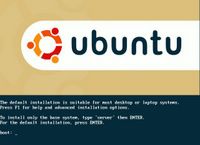
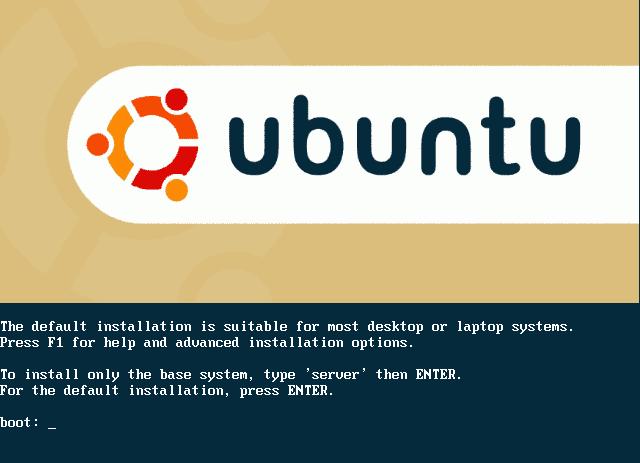
1)Once the CD Autoboots, you would get a Ubuntu Logo Screen with 'boot' prompt...
2)Press ENTER to begin the installation
Note: Entire Installation is in TEXT-Based Mode, no GUI-based is available.
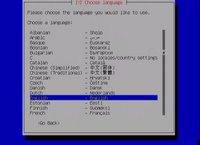
3)It would prompt for 'Choose Language', select English
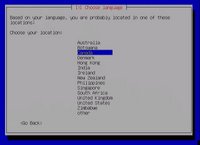
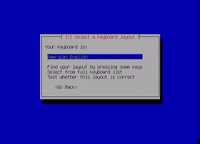
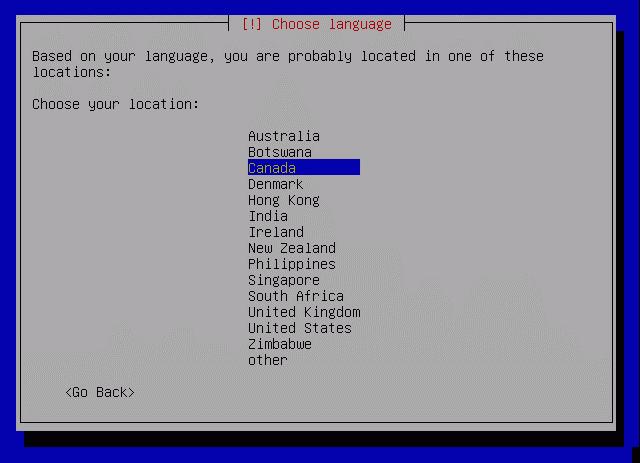
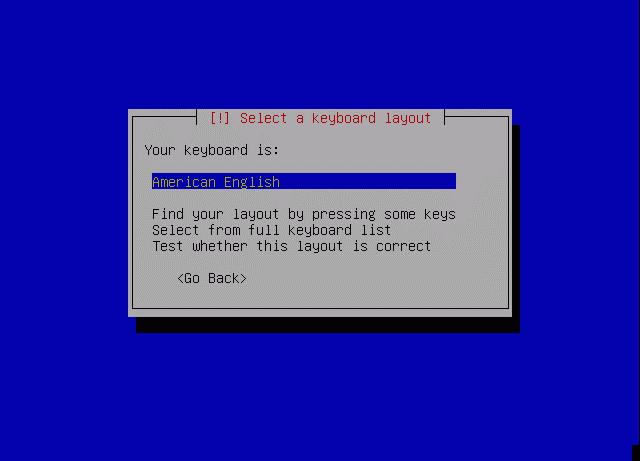
4)Now it prompts for 'Choose Location', select as appropriate5)Keyboard Layout selection confirmation dialog appears...confirm and press ENTER
6)Now various hardware detection and IDE,Ports configuration would take place...so sit back and relax
7)Various Modules and Softwares would be Unpacked next...
8)Network configuration box appears.. It wud try auto-detect via DHCP or if it fails, it would ask whether you want to configure ManuallyYou can select as appropriate...
Note: If you use DSL or PPPoe type Internet Connection, do not configure your internet manually, just skip to next step
9)Now it prompts for the Hostname... by default it says 'Ubuntu', you can configure it to anything...its just like Computer Name while Windows Installation
10)Now main part comes is Partitioning of Disks...
Now, select your appropriate HDD(in-case of multiple hdd's)..
Mostly it would be something like
Erase entire disk: IDE1 master(hda) - 37GB, etc..
11)Next screen it would show you two partitions made, one of 'ext3' filesystem and other a 'SWAP' partitionIf you selected the proper HDD in earlier step... select YES for 'Write Changes to the disk'
12)Now installation of Base System would begin so sit back and enjoy..
13)Timezone configuration box prompts after above step..select your Timezone and confirm
14)Now user setup comes up... Enter your full name for the User, in next screen select a short username for logon (This username is what you would use to login) and then the password bviously!
15)Now, the Boot Loader configuration comes... If it shows your already installed Windows Installation, like Windows XP Professional.. its safe to install the Boot Loader on MBR without any problems...
16)Now, it would prompt for a REBOOT... upon reboot..enter your Bios and put First Boot Priority to Harddisk i.e. ur Windows one
17)Now, it would show you Loading GRUB 1.5..and then list various OS...with 4 entries for ubuntu and under Other Operating Systems, it would list Windows XP Professional
18)Boot your Ubuntu, the first in the listit would complete the remaining installation
19)Now X-Server Configuration appears.. select the various resolutions your monitor supports and confirm
20)Thats it.. your installation is completed and your Ubuntu Logon screen appears.. Put in your 'username' used in step14 and password to get inside.
Now, after installation you can reboot and use your Windows XP by selecting it from the Boot Menu
If you want to configure Windows XP as the default OS for booting each time, boot into Ubuntu Navigate to My Computer>Filesystem>boot>grub>menu.lst
Open the menu.lst file in text editor..it wud be having something like this at start:
# Generated by grubconf-0.5.1
default=1
timeout=10
Change the default=1 to default=4
Thats it...now your XP is the default booting system next time onwards.
Enjoy your Ubuntu..and do let me know if you face problems..
Few Screenshots...
A comprehensive list of screenshots while installation can be checked at: http://shots.osdir.com/slideshows/slideshow.php?release=342&slide=1
Keywords: breezy badger,edubuntu,free,installing ubuntu,linux,linux operating system,linux os,linux support,open source,operating system,software,ubuntu,ubuntu desktop,ubuntu download,ubuntu how to,,ubuntu install,ubuntu laptop,ubuntu linux,ubuntu screenshots,ubuntu server,xubuntu
the CD-Rom...
1)Once the CD Autoboots, you would get a Ubuntu Logo Screen with 'boot' prompt...
2)Press ENTER to begin the installation
Note: Entire Installation is in TEXT-Based Mode, no GUI-based is available.
3)It would prompt for 'Choose Language', select English
4)Now it prompts for 'Choose Location', select as appropriate5)Keyboard Layout selection confirmation dialog appears...confirm and press ENTER
6)Now various hardware detection and IDE,Ports configuration would take place...so sit back and relax
7)Various Modules and Softwares would be Unpacked next...
8)Network configuration box appears.. It wud try auto-detect via DHCP or if it fails, it would ask whether you want to configure ManuallyYou can select as appropriate...
Note: If you use DSL or PPPoe type Internet Connection, do not configure your internet manually, just skip to next step
9)Now it prompts for the Hostname... by default it says 'Ubuntu', you can configure it to anything...its just like Computer Name while Windows Installation
10)Now main part comes is Partitioning of Disks...
Now, select your appropriate HDD(in-case of multiple hdd's)..
Mostly it would be something like
Erase entire disk: IDE1 master(hda) - 37GB, etc..
11)Next screen it would show you two partitions made, one of 'ext3' filesystem and other a 'SWAP' partitionIf you selected the proper HDD in earlier step... select YES for 'Write Changes to the disk'
12)Now installation of Base System would begin so sit back and enjoy..
13)Timezone configuration box prompts after above step..select your Timezone and confirm
14)Now user setup comes up... Enter your full name for the User, in next screen select a short username for logon (This username is what you would use to login) and then the password bviously!
15)Now, the Boot Loader configuration comes... If it shows your already installed Windows Installation, like Windows XP Professional.. its safe to install the Boot Loader on MBR without any problems...
16)Now, it would prompt for a REBOOT... upon reboot..enter your Bios and put First Boot Priority to Harddisk i.e. ur Windows one
17)Now, it would show you Loading GRUB 1.5..and then list various OS...with 4 entries for ubuntu and under Other Operating Systems, it would list Windows XP Professional
18)Boot your Ubuntu, the first in the listit would complete the remaining installation
19)Now X-Server Configuration appears.. select the various resolutions your monitor supports and confirm
20)Thats it.. your installation is completed and your Ubuntu Logon screen appears.. Put in your 'username' used in step14 and password to get inside.
Now, after installation you can reboot and use your Windows XP by selecting it from the Boot Menu
If you want to configure Windows XP as the default OS for booting each time, boot into Ubuntu Navigate to My Computer>Filesystem>boot>grub>menu.lst
Open the menu.lst file in text editor..it wud be having something like this at start:
# Generated by grubconf-0.5.1
default=1
timeout=10
Change the default=1 to default=4
Thats it...now your XP is the default booting system next time onwards.
Enjoy your Ubuntu..and do let me know if you face problems..
Few Screenshots...

A comprehensive list of screenshots while installation can be checked at: http://shots.osdir.com/slideshows/slideshow.php?release=342&slide=1
Keywords: breezy badger,edubuntu,free,installing ubuntu,linux,linux operating system,linux os,linux support,open source,operating system,software,ubuntu,ubuntu desktop,ubuntu download,ubuntu how to,,ubuntu install,ubuntu laptop,ubuntu linux,ubuntu screenshots,ubuntu server,xubuntu
Thursday, December 29, 2005
IndianGuitarTabs Search Plugin for Mozilla Firefox (Windows/Linux)
IndianGuitarTabs.com Search Plugin is a simple Search Plugin for Mozilla Firefox on both platforms of Windows & Linux
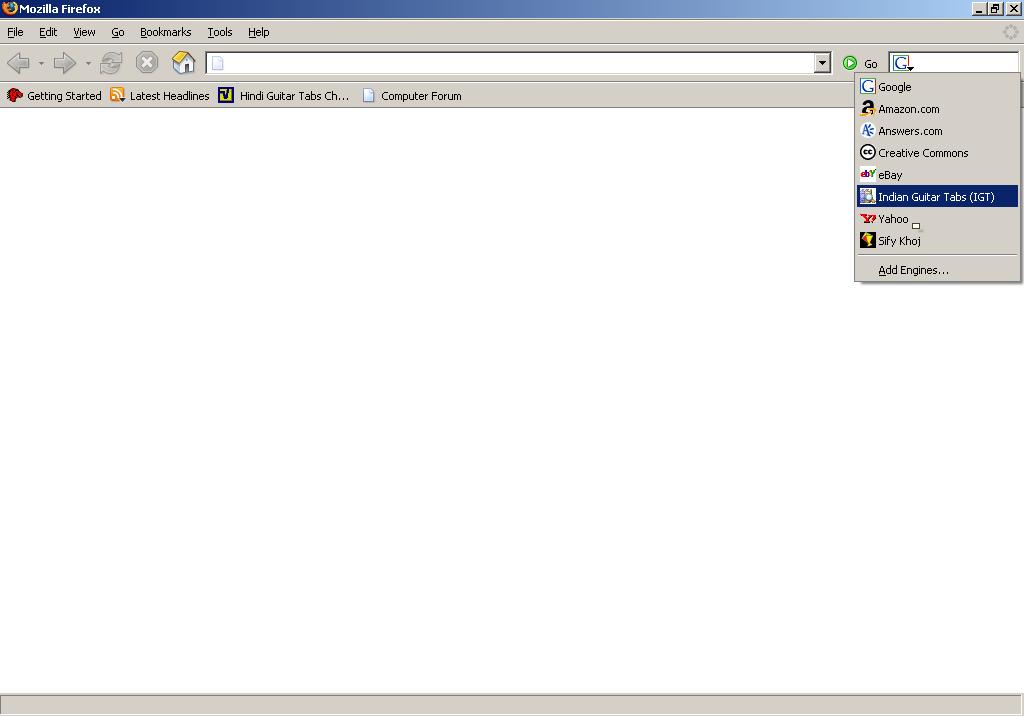
It helps user to directly search for Guitar Tabs/Chords for the site IndianGuitarTabs.com
Since, i am the Technical Administrator for that site, i picked up on the idea by an existing user(Apurbajd) and further modified the plugin for both platforms...
Installation:
For Windows Users...download the file IndianGuitarTabs_Search_Plugin_Windows.zip, unzip and run the setup program for easy installation
Note: If the Installer doesnt pick up the correct location for installation...then please manually browse to the directory:%WindowsRoot%\Program Files\Mozilla Firefox\searchplugins
For Linux Users...download the file IndianGuitarTabs_Search_Plugin_Linux.zip
The Archive contains a readme which would guide the installation procedure for Linux..
A screenshot from Firefox on Windows & Linux has been also attached...Enjoy and have fun..
TestBeds:
Windows: Mozilla Firefox 1.5
Linux (Ubuntu 5.10): Mozilla Firefox 1.0.7
 (Windows)
  (Linux)
Downloads
Windows: http://www.indianguitartabs.com/attachment.php?attachmentid=2981
Linux: http://www.indianguitartabs.com/attachment.php?attachmentid=2982
View my(zoomingrocket) original thread on IndianGuitarTabs.com at:
http://www.indianguitartabs.com/showthread.php?t=16546
Keywords: firebird plugin,indianguitartabs,,indianguitartabs com,mozila plugin,search add,search codec, search engine plugin,search engine plugins,search my,search plugin,search plugins
It helps user to directly search for Guitar Tabs/Chords for the site IndianGuitarTabs.com
Since, i am the Technical Administrator for that site, i picked up on the idea by an existing user(Apurbajd) and further modified the plugin for both platforms...
Installation:
For Windows Users...download the file IndianGuitarTabs_Search_Plugin_Windows.zip, unzip and run the setup program for easy installation
Note: If the Installer doesnt pick up the correct location for installation...then please manually browse to the directory:%WindowsRoot%\Program Files\Mozilla Firefox\searchplugins
For Linux Users...download the file IndianGuitarTabs_Search_Plugin_Linux.zip
The Archive contains a readme which would guide the installation procedure for Linux..
A screenshot from Firefox on Windows & Linux has been also attached...Enjoy and have fun..
TestBeds:
Windows: Mozilla Firefox 1.5
Linux (Ubuntu 5.10): Mozilla Firefox 1.0.7
 (Windows)
  (Linux)
Downloads
Windows: http://www.indianguitartabs.com/attachment.php?attachmentid=2981
Linux: http://www.indianguitartabs.com/attachment.php?attachmentid=2982
View my(zoomingrocket) original thread on IndianGuitarTabs.com at:
http://www.indianguitartabs.com/showthread.php?t=16546
Keywords: firebird plugin,indianguitartabs,,indianguitartabs com,mozila plugin,search add,search codec, search engine plugin,search engine plugins,search my,search plugin,search plugins
Subscribe to:
Posts (Atom)